
The Problem With YouTube Subscriptions
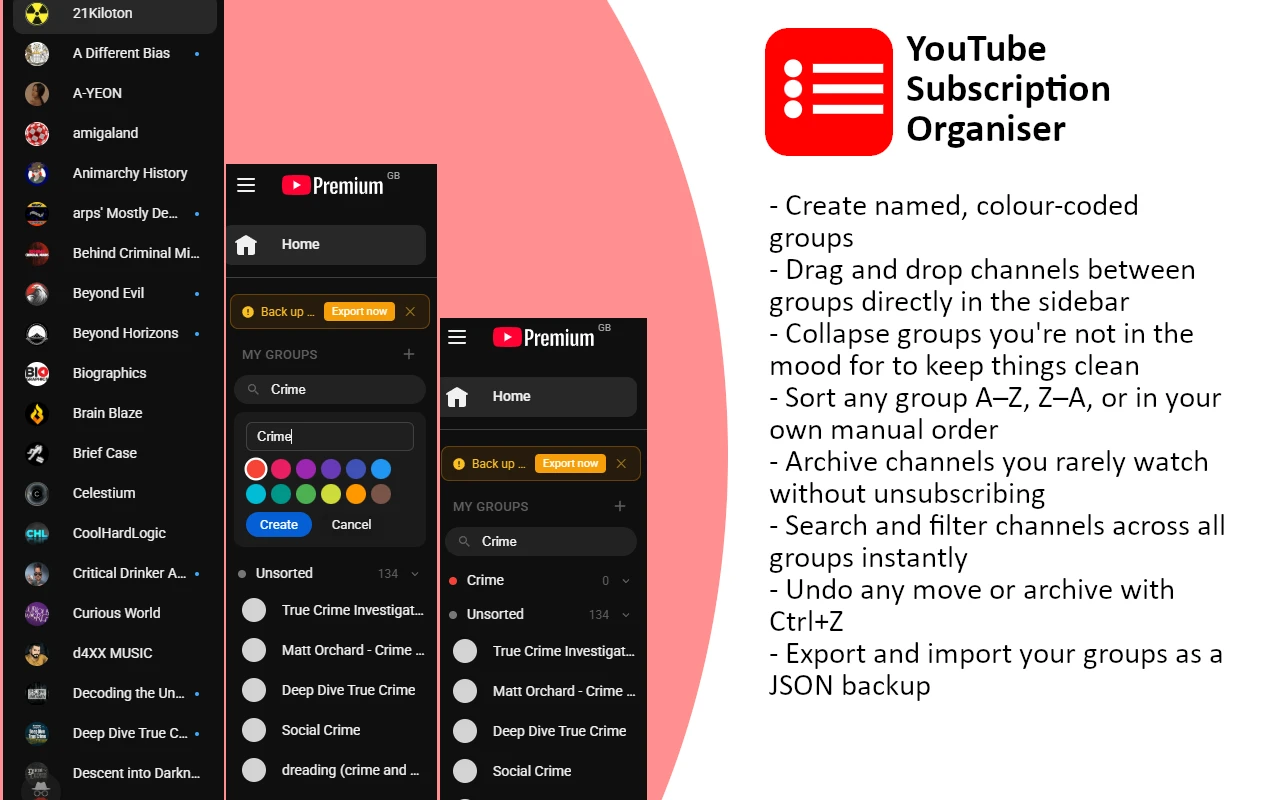
 In case you rely entirely on YouTube for all your entertainment – subscribing to countless channels dedicated to technology, sports, music, games, cooking, or any other type of content that you find interesting – then I am sure you understand how annoying this is. The list goes on and on without end, and there is simply no possible way to categorise it by topics, projects, or even mood.
There is also no way for you to create categories. There is simply no way to tell yourself “I wish to watch some gaming videos” and see those only gaming videos. When you click on the sidebar, you have to scroll down through a total of 130 icons before reaching that single channel you wanted to reach. The button “Show More” hides most of those channels, while the expanded sidebar is nothing but icons.
All your subscriptions are put together in one bulk by YouTube itself. If there are something like twenty to thirty subscriptions, then the list is useless for navigation purposes.
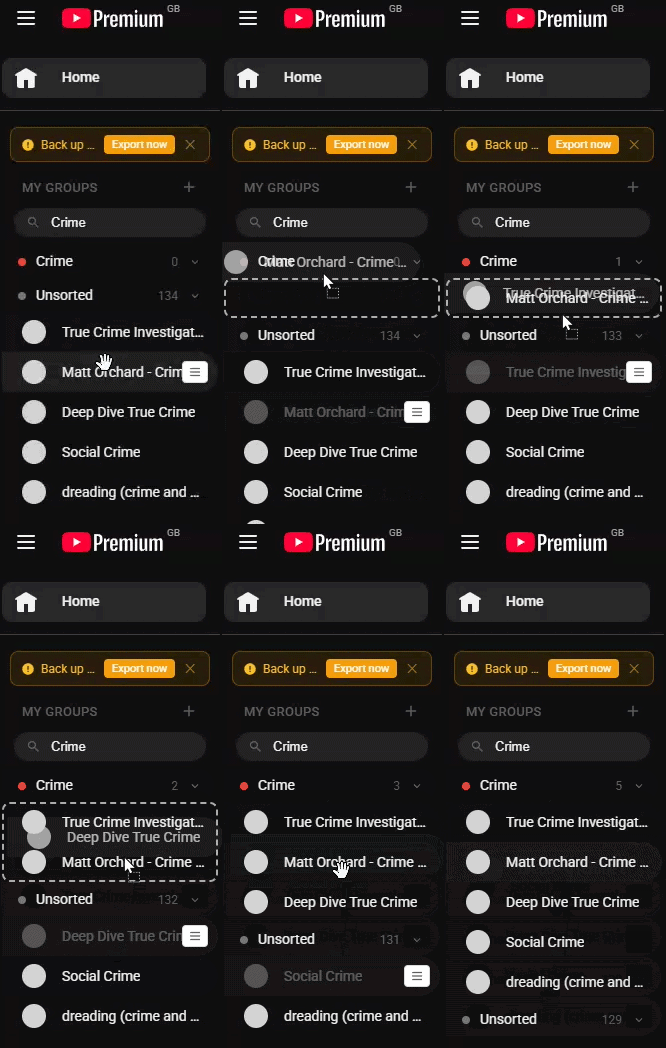
My extension tackles the problem in a different way since it creates custom groups and allows for a personalized view rather than relying on the standard list on the sidebar that YouTube offers. You are free to create your own groups according to categories such as “technology,” “video games,” “music,” and whatever else suits you. Then, you will be able to drag and drop particular channels in those groups.
Choosing the Right Approach
Not even needing to write a single line of code, the basic problem still lingered; how to locate this plugin? Two main methods surfaced.
Method A – Popup Panel: By clicking on the icon for the extension, a popup will be opened. From here, you can control your groups and access channels from this popup.
Method B – Sidebar injection (adopted): Inject this plugin into the YouTube sidebar area, replacing the standard subscriptions list.
While the implementation using popup would be easier, since the popup is essentially just a standard extension popup and it does not rely on any dependency to the DOM tree of the content document, there will be additional steps needed from the user side. Namely, the user should open the popup, locate the required channel, browse it, and then close the popup.
Implementation of sidebar injection gets very good marks for usability. The subscription list appears exactly where the user is expecting to see it. The user does not have to switch context and open another window. Browsing the sidebar is as seamless as browsing the built-in YouTube sidebar, with all channels available after one single click.
However, such an implementation involves much more technical complications, as we are going to include our code inside another webpage’s DOM tree. Moreover, we are dealing with a very customized single-page website which is not reloaded and therefore requires special handling with regards to CSS, DOM structure and rendering cycle. Despite that, we decided to go for it because of its high usability rating.
A new kind of hell
Ah yes, the absolute joy of the migraine inducing YouTube DOM and marvel at all the wonderful work of its authors, who put each and every div into 17 layers of divs for additional emotional support, class names look like someone dropped a keyboard down the stairs, and the CSS operates on the bold assumption that specificity is a competitive blood sport.
That ladies and gentlemen, is what we call modern-day web engineering. It’s a FUCKING mess.
Architecture and Storage Design
Extension design follows the Manifest V3 extension format. MV3 has enhanced background pages with the use of service workers, tightened Content Security Policy rules, and made API compatible with modern web APIs. In our case, there is no need to use any background service worker because all operations happen inside the content script on YouTube webpage and in the popup.
Since our extension works using only standard Manifest V3 APIs, it will work out-of-the-box in Chrome and Microsoft Edge browsers.
Splitting storage: sync vs local
Another rather interesting thing about this project was managing storage. The storage in Chrome / Edge extensions consists of two types, namely chrome.storage.local and chrome.storage.sync. Local storage is device-specific with maximum capacity of 5MB. Sync storage is connected to the user’s Google account with maximum 100KB of capacity, and with 8 KB per entry.
We did not store all data in one place, but divided it according to:
Synchronised across all devices (chrome.storage.sync): group definitions (name, colour), group/channel assignments, collapsed state, archived channels, and sort preferences. These are conscious choices made by the user. You have put twenty minutes of your time into organising 150 channels into eight groups; you don’t want to redo that on another computer.
Stays local (chrome.storage.local): channel metadata such as avatar URLs, channel names, and hrefs. All this information is scraped from YouTube’s own DOM each time it loads. There is no need to synchronise avatar URLs – YouTube hosts them from its CDN regardless of which device you’re using. Keeping this local also saves on the sync quota.
Quota management: Considering an average user with 200 subscriptions and 15 groups, their data will amount to around 25 – 35 KB – comfortably within the 100 KB sync quota. Quota-exceeded errors are handled gracefully by falling back to local storage and logging a warning.
This module also handles migration from a previous version of the storage format (using only the ytso_v1 local key). If there is no sync data on first launch but old local data is present, the old format is read and then rewritten in the new format.
// chrome.storage.sync
{
  ytso_groups:  [ { id, name, color } ],
  ytso_assigns: { channelId: groupId | "unsorted" },
  ytso_meta: {
    collapsed: { groupId: boolean },
    archived:  { channelId: true },
    sortModes: { groupId: "manual" | "az" | "za" }
  }
}

// chrome.storage.local
{
  ytso_channels:   { channelId: { name, avatar, href } },
  ytso_lastbackup: timestamp
}
Injecting Into a Live Page
The content script is supposed to find the “subscriptions” tab in the sidebar, delete the old options from there and replace them with our own customised UI. It appears to be an easy feat, but actually it’s quite difficult to implement.
Finding the subscriptions section
Each of the tabs in YouTube’s sidebar are created with custom-made componentsytd-guide-section-renderer, where each tab corresponds to one component. One way to distinguish the subscriptions tab is through its title, which must be “Subscriptions.” Another method is through finding anchors with /@ or /channel/ fragments in them.
function findSubsSection() {
  for (const section of document.querySelectorAll('ytd-guide-section-renderer')) {
    const title = section.querySelector('#section-title, [class*="section-title"]');
    if (title && /subscriptions/i.test(title.textContent.trim())) return section;
    if (section.querySelector('a[href^="/@"], a[href^="/channel/"]')) return section;
  }
  return null;
}
The insertBefore trap
In our initial attempt at injecting our panel, we used insertBefore to insert our panel before YouTube’s first subscription list entry. The problem here was a NotFoundError because querySelector doesn’t filter elements to only return children; rather, it searches the whole subtree. Our target element ended up being deeply nested inside the parent element we wanted to insert before.
The solution here was simple – stop using insertBefore altogether. We simply find the container where the list entries are stored and append our panel to the front using prepend(). It will always work since the insertion point is the containing element itself:
const container = subsSection.querySelector('#items, #contents') || subsSection;
container.prepend(mount);
The original subscription elements are obscured rather than deleted, since YouTube’s state management uses these elements to keep track of the current subscription. If they were deleted, there would be some obscure issues arising in YouTube’s internal code. Using display: none leaves them intact, but they become invisible to users. The native Subscriptions feed element (/feed/subscriptions) remains visible as an accessibility backup.
Scraping channel data
Now that we’ve identified our target section, we need to scrape the relevant information about each channel from the original elements before deleting them. Each YouTube subscription is rendered as a ytd-guide-entry-renderer element, which contains an anchor, image, and title element.
The “Show more” button is problematic since YouTube only displays about ten subscriptions and then collapses the remaining subscriptions under a button. Prior to scraping, we simulate a click on this expandable button and pause momentarily for the DOM to render fully. In other words, we get everything and not just the slice that YouTube allows us to see.
UI and UX Design Decisions
Looking native
One of the most crucial considerations in the design process was to have the extension feel native to YouTube rather than feel like an add-on. YouTube has very specific visual guidelines, such as using 40px height items, 24px circular avatars, rounded rectangle hover effects, and a particular typography hierarchy. These design aspects are purposefully copied from YouTube.
As opposed to coding in colours directly, the extension uses YouTube’s own custom properties for colours via their CSS variables --yt-spec-text-primary, --yt-spec-base-background, --yt-spec-10-percent-layer, and many others. YouTube sets those custom properties for both dark and light themes in the document root.
CSS variable inheritance problem: In real life, YouTube CSS variables don’t inherit into content script styles during dark mode very reliably. The fallback colour invar(--yt-spec-text-primary, #0f0f0f) results in black text on a black background, thus, hiding all text. The solution to this was to define specific overrides for dark mode for every single text tag, ensuring that text is displayed in white in dark mode at all times.
Hover-reveal controls
Buttons for group editing, deletion, and sorting are hidden until you hover over them using CSS. This means that these actions will only appear when you need them, allowing the sidebar to be less cluttered when you are simply navigating around. This method is also used for the “move” button that appears when hovering over each channel.
Inline forms over modals
Creating a new group uses an inline form that drops down from the header, rather than a modal overlay. For such a simple input – a name and a colour – the overhead of a modal feels excessive. The inline form is faster to reach and dismiss, and keeps focus within the sidebar rather than pulling attention to the centre of the screen.
The editing of an existing group is the only instance in which we use a modal window. This differentiation was purposeful, as creating something is a fast action and editing involves a deliberative thought process (modal dialogues with clear Save and Cancel buttons).
Colour coding
Groups may be selected to have one of the twelve distinct colours, from the palette of colours provided by Material Design. These colours will show up as dots within the group header and not a full background colour, as it will be too overpowering alongside the content that is shown on YouTube.
Feature Walkthrough
- Custom Groups: Create your own groups that are colour-coded and drag channels into those groups. A group displays how many channels are in it.
- Drag-and-Drop: Drag channels to different groups within the sidebar panel. The drop targets will highlight when dragging.
- Sorting Methods: Sort channels per-group using either manual sorting, A to Z, or Z to A options. Change sorting methods using just one click.
- Archiving: Archive channels you don’t use often. They are easy to restore from the Archived section later.
- Undo: Use Ctrl + Z to undo your last action of moving or archiving a channel. You can revert up to 20 actions in a session.
- Automatic Syncing: Channels, along with their groups, get synced on all devices using the same Google account.
- Search Functionality: Search for channels in all groups using the search bar in the top right corner.
- Active Channel Indicator: If you visit a channel page, it gets highlighted in the sidebar with a red border next to it and is scrolled into view.
- Backup Prompt: After going 28 days without exporting, an amber-coloured bar will remind you to back up your list with a JSON file.
The undo stack
It is purposely added since it is relatively easy to misunderstand and assign a channel to an incorrect group by dragging. The undo operation is only valid on a per-session basis and will not be saved. Moreover, the operation will also get erased if the user navigates away from the app or even reloads the webpage. The logic behind this is that there is no sense in keeping the undo action since it entails too much work but gives nothing in return.
The data kept by each action stored in the stack includes the type of the action performed, the ID of the channel, and the ID of the source group. It is sufficient information to completely revert any move or archiving within constant time.
// Move between groups
{ type: 'move',    cid: 'channelId', fromGid: 'gaming', toGid: 'tech' }

// Archive a channel
{ type: 'archive', cid: 'channelId', fromGid: 'gaming' }

// Restore from archived
{ type: 'unarchive', cid: 'channelId' }
Active channel highlighting
Once the user reaches the channel page, the extension checks whether the current url pathname matches any href attribute value for the channels in storage. If a match exists and the group is expanded, the class ytso-ch--active is added to the channel link. A very thin red left-border highlight makes it clear which channel the user is currently viewing, while scrollIntoView makes sure the channel comes into view.
In case the group with the currently viewed channel is collapsed, the highlight will not be applied since the user did that intentionally. This function applies to channels viewed via direct access to the channel page:/@channelname or/channel/UCxxxxxx urls. Watch video urls (like/watch?v=...) do not indicate which channel the user views, and thus no highlighting happens.
The backup reminder
The storage system for chrome.storage.sync is based in the cloud. Cloud systems are prone to data loss. Extensions can be restored, browsers can be switched out. The backup reminder is there to get people thinking about making a backup copy of their groups locally in a JSON file which they own and control.
The reminder frequency is set at 28 days (four weeks). This seems to be sufficiently often without being too disruptive. A reminder once per week would cause people to just ignore the message whereas a reminder once per quarter leaves long periods without a backup.
The timestamp of the most recent export is saved in chrome.storage.local, not in sync. Backup timestamps are specific to each computer; an export from a personal computer cannot guarantee you have that file on your work computer, and vice versa.
Security Considerations and Fixes
Such content scripts that construct DOM using user data have to be created carefully. The extension employs the innerHTML property for rendering its sidebar interface – an approach that is efficient yet leads to multiple attack vectors if the input is not sanitized. Three specific vulnerabilities were discovered.
| Vulnerability | Risk | Vector | Fix |
|---|---|---|---|
CSS injection via colour field – group colour inserted directly into style="" without CSS-specific sanitisation |
Medium | Malicious import file | Validate against known colour palette |
javascript: href injection – channel hrefs from imported JSON rendered as clickable links without protocol validation |
Low -Med | Malicious import file | Allow only /@ and /channel/ prefixes |
| Insufficient import validation – imported JSON only checked for top-level structure, not field contents | Low | Malicious import file | Full field-level sanitisation on all imported data |
The CSS injection detail
The original code rendered group colours directly into a style attribute:
<!-- Before - vulnerable -->
<span class="ytso-dot" style="background:${g.color}"></span>
The HTML escaping function esc() encodes <, >, &, and " – but CSS does not use those characters for injection. A colour string of red; background-image: url(https://tracker.example.com/pixel.gif) would pass through esc() unmodified and execute as valid CSS. This is a classic CSS injection via style attribute.
The fix is a whitelist validation function that only passes values that exist in our known colour palette:
const COLOR_SET = new Set(COLORS);

function safeColor(color) {
  return COLOR_SET.has(color) ? color : COLORS[5];
}

// Usage
<span style="background:${safeColor(g.color)}"></span>
The href validation detail
When scraping channels from YouTube’s DOM, hrefs are already filtered – only /@ and /channel/ paths are accepted. But this check did not apply to imported JSON. A crafted import file could include a channel with href: "javascript:alert(1)", which would be stored and then rendered as a valid-looking clickable link in the sidebar.
The safeHref() function now enforces the same prefix check at all entry points – both scraping and importing:
function safeHref(href) {
  const s = String(href ?? '');
  return (s.startsWith('/@') || s.startsWith('/channel/')) ? s : '';
}
A similar function, safeAvatarUrl(), enforces that avatar image URLs must begin with https://, blocking data: URIs and any non-HTTPS scheme.
Practical risk context: All three vulnerabilities require the user to willingly import a malicious JSON file. They cannot be triggered by visiting YouTube, watching videos, or subscribing to channels. The real-world risk is low – but the fixes are inexpensive and the principle of validating all inputs at system boundaries is worth maintaining regardless of probability.
Surviving YouTube as a Single-Page App
YouTube does not navigate in the traditional sense. When you click a link, the URL changes and content updates, but the page itself never fully reloads. This is a single-page application pattern – the browser’s back/forward navigation is simulated through the History API, and the DOM is mutated in place rather than rebuilt from scratch.
For a content script that needs to inject UI into the page, this creates a lifecycle problem. The standard DOMContentLoaded event fires once – on the initial hard load – and never again. Every subsequent navigation is invisible to a naive content script.
The MutationObserver approach
We use two mechanisms together. First, a MutationObserver watches the document body for child-list mutations. When the subscriptions section appears in the DOM (which happens asynchronously after page load), the observer fires our bootstrap function. Once injection is successful, the observer disconnects to avoid unnecessary overhead.
- Initial load: MutationObserver detects when
ytd-guide-section-rendererelements appear in the sidebar and triggers the bootstrap sequence. - SPA navigation: YouTube dispatches a custom
yt-navigate-finishevent on the window after each navigation completes. We listen for this to trigger re-injection when needed. - Debounce guard: A
readyflag and attempt counter prevent the bootstrap function from running multiple times concurrently or hammering the DOM indefinitely if YouTube takes longer than expected to render.
Persistent guide sidebar
One critical insight is that YouTube’s guide sidebar (ytd-guide-section-renderer) is a persistent DOM node – YouTube’s SPA reuses it across all navigations rather than recreating it. Channel pages in particular fire yt-navigate-finish multiple times as tabs and content load. An earlier version of the extension removed and re-injected the sidebar mount on every navigation event, causing the “My Groups” panel to disappear on channel pages because the re-injection couldn’t keep up with the rapid event sequence.
The fix is to check whether the mount is still attached to the document before deciding to re-inject:
window.addEventListener('yt-navigate-finish', () => {
  bootGeneration++;
  ready    = false;
  attempts = 0;
  clearTimeout(navDebounce);
  navDebounce = setTimeout(() => {
    // Guide sidebar persists across navigations - if mount is still
    // in the document, just update the active channel highlight.
    if (mount && document.contains(mount)) {
      highlightActiveChannel();
      return;
    }
    mount = null;
    observer.observe(document.body, { childList: true, subtree: true });
    bootstrap().then(() => highlightActiveChannel());
  }, 1200);
});
The 1200ms debounce is intentional. YouTube’s sidebar does not re-render immediately after navigation – it takes several hundred milliseconds for the guide to populate with fresh content. The debounce also collapses multiple rapid yt-navigate-finish events into a single bootstrap attempt.
A bootGeneration counter invalidates any in-flight bootstrap if another navigation fires mid-await. Bootstrap captures the current generation before its first await and bails out if it no longer matches by the time the async work completes.
Handling Dark Mode and YouTube’s CSS
YouTube’s dark mode is activated by adding a dark attribute to the html element. Their CSS then redefines a set of custom properties under html[dark] – for example, --yt-spec-text-primary shifts from near-black to near-white.
The complication is that CSS custom properties defined in an external stylesheet – like YouTube’s own CSS file – do not always reliably cascade into content script stylesheets in all configurations. When the variable fails to resolve, the fallback value in var(--yt-spec-text-primary, #0f0f0f) is used. That fallback is #0f0f0f – almost identical to the dark mode background of #0f0f0f.
The visible symptom is subtle: group names and channel names disappear entirely. Only elements with explicitly non-black fallbacks remain visible. The channel count badges, which use #606060 as their fallback (mid-grey), remain readable on a dark background. Everything else becomes invisible text on an invisible background.
The fix is to add a comprehensive html[dark] override block at the end of the stylesheet that explicitly sets all text colours for dark mode, bypassing the variable chain:
/* Default: uses YouTube's CSS variables, falls back for light mode */
.ytso-toggle {
  color: var(--yt-spec-text-primary, #0f0f0f);
}

/* Explicit dark mode override - doesn't rely on variable inheritance */
html[dark] .ytso-toggle,
html[dark] .ytso-ch {
  color: #f1f1f1;
}
This pattern – use CSS variables for the common case, add explicit html[dark] overrides for the dark mode case – ensures correct rendering regardless of how YouTube’s CSS variables happen to cascade in any given browser or extension configuration.
Lessons Learned
Building against a live, frequently-updated web application like YouTube is a different exercise from building against a stable API. A few things stand out as worth noting for anyone building something similar.
Assume the DOM will change
YouTube’s DOM structure is not documented and is not stable. Element IDs, class names, and nesting hierarchies change with YouTube’s own deployments. The extension defends against this with multiple fallback selectors everywhere – #section-title, [class*="section-title"] rather than a single brittle selector. The scraping also validates each entry rather than assuming a fixed structure.
Never trust your own storage
The import feature accepts arbitrary JSON from the user’s filesystem. That JSON must be treated as untrusted input even though it came from your own export – files can be edited, corrupted, or replaced. The sanitiseImport() function validates and clamps every field before anything touches storage. This is not paranoia; it is the standard practice for any data entering a system boundary.
Respect user preferences in automation
An early version of the extension automatically expanded any collapsed group when the user navigated to a channel inside it – a convenience feature intended to keep the active channel visible. In practice it was maddening: users would collapse the Unsorted group to reduce sidebar clutter, navigate to a video from that channel, and find it had sprung open again. The fix was simple – if the user collapsed a group, that preference is honoured. The active channel highlight still fires; it is just not visible until the user chooses to expand the group.
CSS specificity wars are winnable
YouTube’s CSS is dense and not always predictable in how it cascades. Rather than fighting for specificity point-by-point, the extension uses its unique #ytso-mount container ID as a prefix where needed, giving its selectors enough specificity to win most conflicts without resorting to !important wholesale.
The best UX is invisible
The most positive feedback signal for a sidebar injection extension is when the user forgets they installed anything and simply navigates YouTube the same way they always have – but now their subscriptions are organised. Every design decision was filtered through that lens: does this feel like YouTube, or does it feel like a foreign object dropped into the page? Matching heights, border radii, colour values, and typography hierarchies down to the pixel is not pedantry – it is the difference between a tool that feels native and one that feels like an intrusion.
The goal was never to make the extension visible. The goal was to make the subscription list useful. The best interface is the one you stop noticing.
The extension is available as an open-source project. The full source – manifest, content script, popup, and stylesheet – is around 700 lines of vanilla JavaScript and CSS, with no external dependencies. If you have ever watched your subscription list grow past the point of usefulness and wished YouTube would just let you sort things into folders, this is the folder system.
Comments (0)